Streamline your SaaS ecosystem: Take control, reduce costs, and
boost productivity with ManageEngine SaaS Manager Plus
SaaS user management involves overseeing and controlling the access, usage, and permissions of users across different SaaS applications. This includes managing user roles to ensure that employees have the appropriate access required for their job responsibilities. Additionally, it involves tracking user activity to identify underutilized tools, ensure compliance, and minimize risks. SaaS user management also ensures adherence to security compliance standards, safeguarding sensitive business data and mitigating the risks of unauthorized access.
Effective SaaS user management plays a pivotal role in ensuring that businesses can maximize the benefits of their SaaS applications while mitigating potential risks. Beyond just security and compliance, it enables organizations to operate efficiently, reduce costs, and maintain a robust IT infrastructure. Below are some key reasons why SaaS user management is indispensable:
Improves operational efficiency: With streamlined processes for user provisioning, deprovisioning, and access control, organizations can reduce the time spent on administrative tasks and focus on strategic objectives.
Mitigates insider threats: By monitoring user activity and implementing role-based access controls, businesses can identify and address potential insider threats, ensuring the integrity of their systems.
Enhances productivity: Proper user management ensures that employees have access to the right tools and resources, reducing downtime and improving their ability to work efficiently.
Supports scalability: As organizations grow, SaaS user management ensures that the onboarding of new employees and the integration of new tools can be managed seamlessly without overwhelming IT teams.
Facilitates better decision-making: With detailed insights into SaaS usage and user activity, businesses can make data-driven decisions to optimize their software investments and plan for future needs.
By addressing these critical aspects, SaaS user management becomes a cornerstone for secure, efficient, and cost-effective business operations.
SaaS user account management refers to the processes and tools that administrators use to manage individual user accounts within SaaS applications. This involves adding new users to ensure they can access the required tools for their roles and removing users who no longer need access, such as employees who leave the organization. It also includes assigning roles and permissions to define what specific functions or data a user can access within each SaaS application. Additionally, SaaS user account management entails monitoring account activity to identify anomalies, maintain efficient software use, and ensure adherence to security protocols.
Managing SaaS users efficiently can be challenging due to various organizational, technical, and operational factors. These challenges, if left unaddressed, can lead to inefficiencies, security risks, and increased costs. Below is a detailed breakdown of the key challenges in SaaS user management:
Departmental silos: Different departments may use their own SaaS tools without consulting IT or central administrators, creating silos in user management.
Lack of visibility: IT teams often lack a centralized view of all SaaS tools and their users, making it difficult to track access, activity, and licenses.
Inconsistent policies: Decentralization can lead to inconsistent enforcement of access policies and security protocols across teams and applications.
Unauthorized SaaS usage: Employees may subscribe to SaaS tools without informing IT, creating unmanaged and untracked SaaS environments.
Security risks: Unauthorized tools may lack adequate security measures, exposing the organization to data breaches and compliance violations.
Wasted resources: Shadow IT often results in redundant subscriptions and underutilized SaaS tools, increasing costs unnecessarily.
License waste: Many organizations over-provision licenses, assigning more than required, or fail to deactivate unused accounts for former employees.
Dormant accounts: User accounts that remain inactive for long periods can accumulate, leading to higher licensing costs and creating unnecessary vulnerabilities.
Difficulty in optimization: Identifying underused licenses and reclaiming them without centralized oversight can be a daunting task.
Time-consuming processes: Onboarding and offboarding users manually for multiple SaaS applications are repetitive and time-intensive tasks for IT teams.
Human error: Manual processes are prone to errors, such as assigning incorrect permissions or failing to deactivate accounts when employees leave.
Compliance risks: Inconsistent or delayed deprovisioning can result in unauthorized access to sensitive information, violating compliance standards.
Lack of role-based standardization: Organizations often lack clear role definitions, resulting in inconsistent access permissions across users.
Security vulnerabilities: Over-permissioned users may access data or tools beyond their job scope, increasing security risks.
Difficulty in scaling: Managing permissions for a growing workforce becomes increasingly complex without a standardized system.
Limited insights: Organizations struggle to track user activity and SaaS tool utilization, leaving them blind to inefficiencies or security risks.
Detecting suspicious behavior: Without proper monitoring, identifying unusual activity—such as unauthorized data access or account breaches—is difficult.
Missed optimization opportunities: Inadequate tracking of usage data makes it hard to identify tools that are underutilized or need better adoption strategies.
Duplicate SaaS tools: Different teams may subscribe to multiple tools offering similar functionalities without coordination, resulting in redundant spending.
Unused licenses: Organizations often pay for unused or underutilized SaaS licenses due to poor tracking and management.
Unpredictable billing: SaaS tools with variable billing models can lead to unpredictable expenses if usage is not closely monitored.
Disconnected systems: Many SaaS tools operate independently, making it difficult to establish a seamless workflow or centralize user management.
Data silos: Lack of integration leads to fragmented data, making it harder to analyze overall SaaS performance or user activity.
Increased IT workload: IT teams must manage multiple platforms manually, increasing their workload and reducing operational efficiency.
Data privacy concerns: Mismanagement of user data or permissions can lead to violations of data privacy regulations like GDPR, CCPA, or HIPAA.
Audit failures: Poor record-keeping of user access and activity logs can result in non-compliance with regulatory requirements.
Lack of standardized policies: Without proper governance, organizations risk penalties and legal issues due to non-compliance with industry standards.
Adoption challenges: Employees may resist new SaaS tools or changes to their existing workflows, leading to poor adoption rates.
Training gaps: Inadequate training on SaaS management policies and tools can cause confusion and inefficiencies.
Misuse of tools:Lack of understanding about assigned SaaS tools can result in improper use, reducing productivity and increasing costs.
Unmanaged access points: With numerous SaaS tools in use, each with its own login credentials, the number of access points increases, creating more opportunities for cyberattacks.
Credential sharing: Employees sharing credentials for SaaS tools can compromise the security of sensitive business data.
Failure to enforce MFA: Many SaaS tools allow access without multi-factor authentication (MFA), increasing the risk of unauthorized logins.
Growing workforce: Managing user access and permissions for a growing workforce can strain IT resources and existing processes.
Increasing SaaS adoption: As organizations adopt more SaaS tools, maintaining a centralized and streamlined management system becomes increasingly complex.
Resource constraints: Scaling SaaS management practices often requires additional resources and infrastructure, which may not be readily available.
Insufficient metrics: Many organizations lack access to detailed analytics on SaaS usage, user behavior, and license efficiency.
Difficulty in decision-making: Without actionable insights, it becomes challenging to make informed decisions about SaaS investments and optimizations.
Inconsistent reporting: Fragmented data from multiple tools can result in inconsistent or incomplete reporting, reducing visibility.
Effective SaaS user management is critical in overcoming these challenges. Organizations must adopt centralized SaaS management platforms, implement role-based access controls, and regularly audit their SaaS ecosystem to ensure optimal performance. By addressing these pain points, businesses can enhance security, streamline workflows, and reduce costs, ultimately fostering a more efficient and compliant SaaS environment.
ManageEngine SaaS Manager Plus offers a range of comprehensive features tailored to simplify and optimize the user management process across all your SaaS applications. Below are the key features that make SaaS user management easier and more effective:
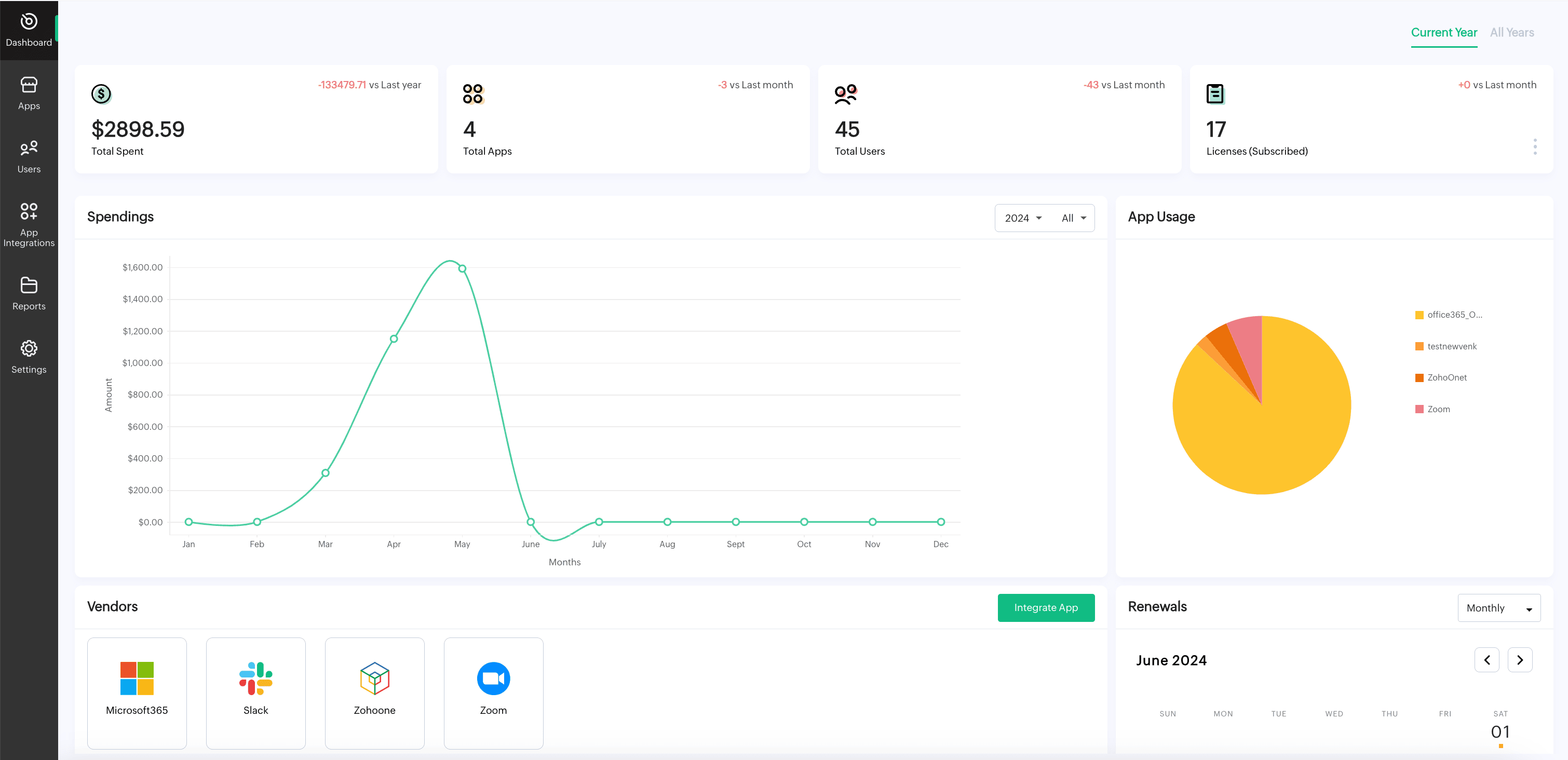
SaaS Manager Plus provides a single, easy-to-use dashboard that allows admins to monitor user activity across all SaaS tools. This centralized system enables IT teams to gain visibility into user accounts, permissions, and activity status in real-time.
Manual user onboarding can be time-consuming and error prone. With automated provisioning, SaaS Manager Plus makes adding users to applications seamless and error-free. This feature ensures that only authorized users have access to the applications they need—without manual intervention.
RBAC helps define specific user roles within SaaS Manager Plus, ensuring that users only have access to the features or data they need for their job. By limiting access based on roles, you minimize security risks, prevent unauthorized access to sensitive data, and ensure efficient software resource allocation.
SaaS Manager Plus offers detailed reporting on user activity, providing insights into how applications are being used across the organization. Admins can track activity levels and gain a better understanding of which SaaS tools are driving value for the business. The tool provides real-time data on user actions, making it easy to monitor usage trends and optimize SaaS costs based on actual application usage.
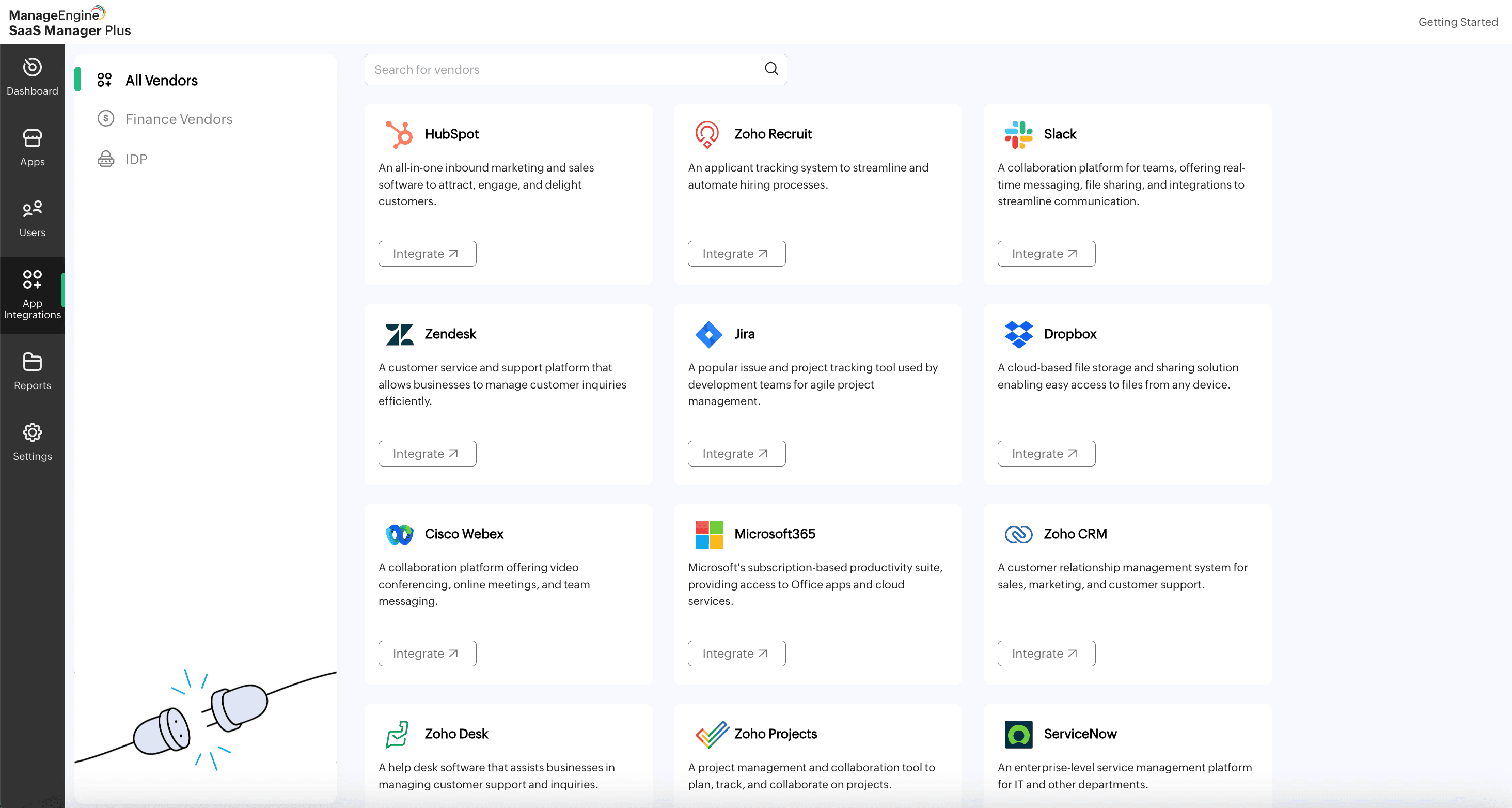
SaaS Manager Plus integrates seamlessly for organizations using popular IAM systems like Okta and Microsoft365, reducing the complexity of synchronizing user identities across multiple SaaS applications.
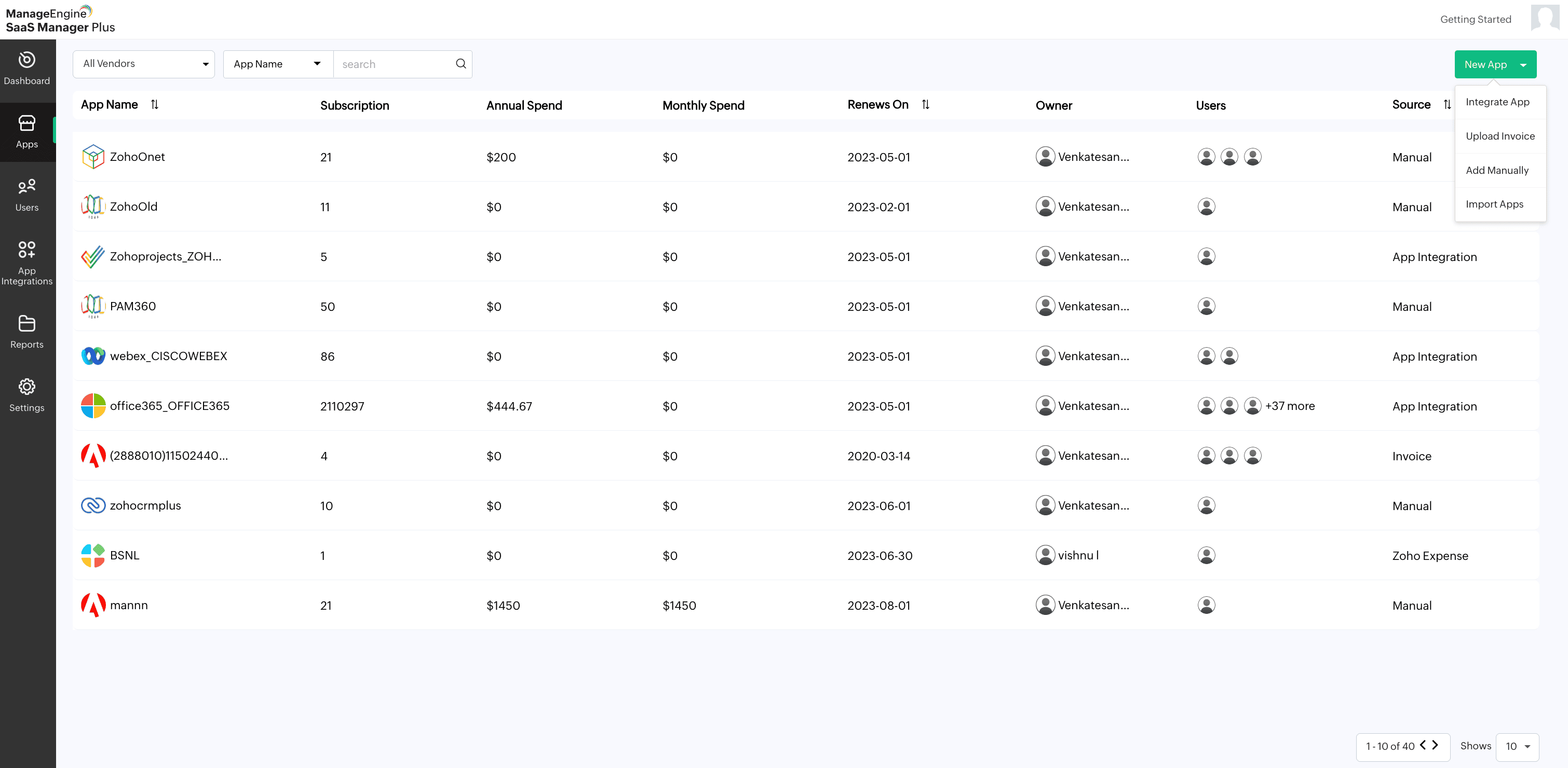
SaaS Manager Plus provides support for multiple SaaS applications, enabling businesses to manage user access and activity across all tools from one platform. With a single dashboard, IT teams can control which users have access to each application, manage licenses, and monitor usage patterns for each tool. This eliminates the hassle of juggling multiple dashboards and provides a unified view of all SaaS subscriptions.
Managing licenses across several SaaS applications can be complex, especially when the amount of users fluctuates. SaaS Manager Plus simplifies license management by providing insights into how many licenses are in use, how many are available, and whether licenses are being used efficiently. Admins can adjust license allocations based on user activity, ensuring that the company is not paying for unused subscriptions.
With SaaS Manager Plus, admins can create and customize user reports that are tailored to their specific needs. These reports provide visibility into various metrics, such as user activity, app usage, and license consumption. Customizable reports make it easy for teams to get the insights they need to improve efficiency, optimize costs, and ensure compliance with software usage policies.
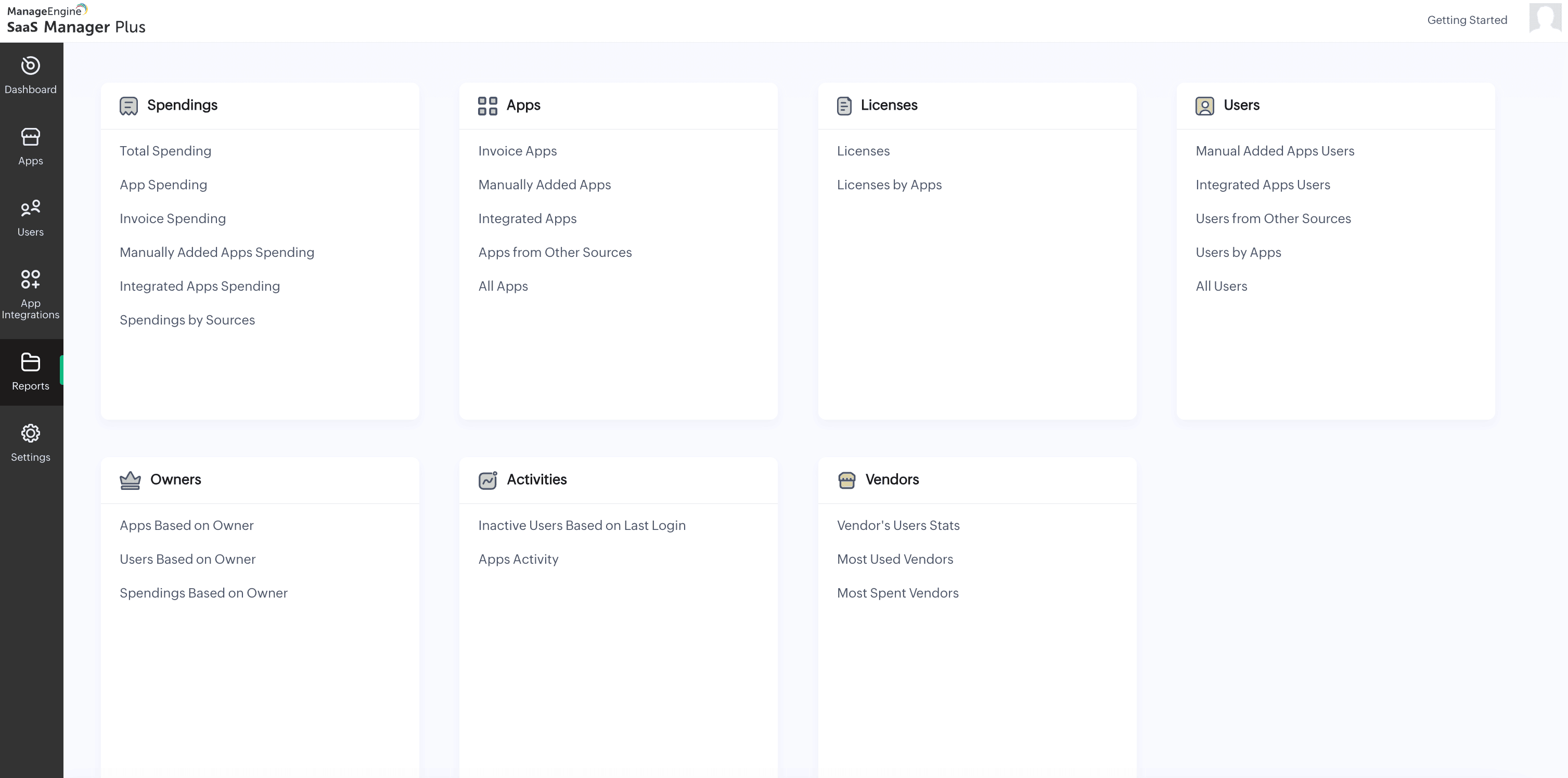
SaaS Manager Plus automatically sends timely reminders for subscription renewals. This prevents service lapses, ensuring that you don't miss any critical renewals. Your team has ample time to review contract terms, negotiate better deals, or cancel underutilized subscriptions by receiving alerts well in advance.
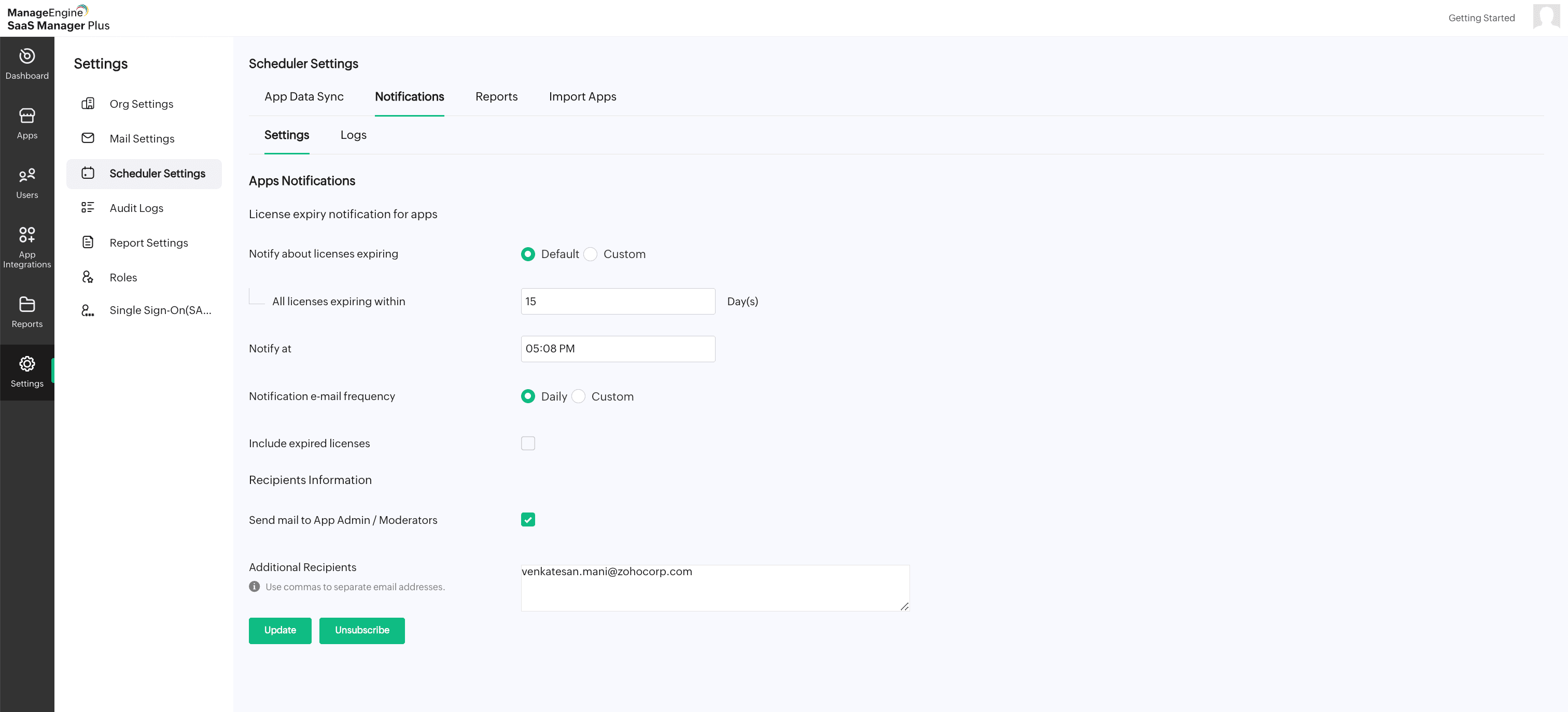
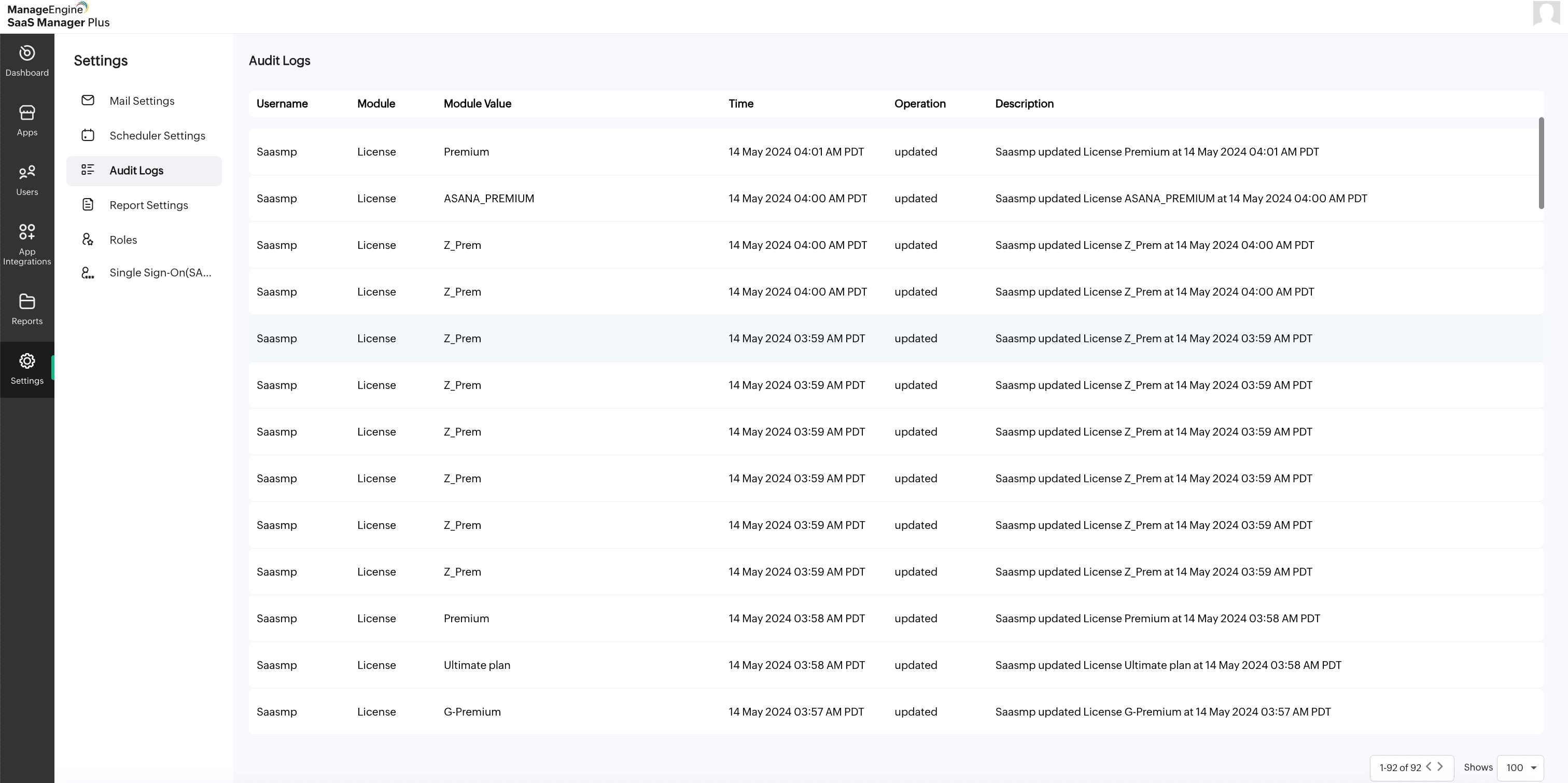
Tracking user access changes is essential for both security and compliance. SaaS Manager Plus provides detailed audit trails that log every change in user access, including: when users are added, removed, or assigned new permissions. These audit logs offer transparency and accountability, making it easy to review and investigate any potential security issues or access discrepancies.
SaaS Manager Plus helps identify and manage shadow IT by providing visibility into all SaaS tools being used across your network. This feature ensures that all applications are tracked, reducing the chances of security breaches and unmonitored expenses while helping to maintain compliance and control.
Organizations can make data-driven decisions about renewing or canceling subscriptions by tracking which apps are being used most frequently and which ones are underutilized. This data also helps determine whether additional training is needed for tools that are not being fully utilized, ensuring that investments in SaaS tools are yielding maximum value.
By offering these essential user management features, SaaS Manager Plus enables businesses to efficiently manage user access, maintain security, and optimize SaaS spending.
Implementing best practices for SaaS user management is essential for ensuring secure, efficient, and cost-effective use of SaaS applications. These practices not only strengthen security but also help streamline workflows, optimize software usage, and support organizational growth. Below are the key best practices every organization should follow:
Centralizing user management involves consolidating control over all user accounts across various SaaS tools into a single platform, like SaaS Manager Plus. This approach provides administrators with full visibility into user access, activity, and permissions, allowing them to make informed decisions about software usage and security.
Automating user provisioning ensures that onboarding new employees and offboarding departing ones is seamless and error-free. Automation eliminates manual steps, reduces the risk of human error, and speeds up the process of granting or revoking access to SaaS tools, ensuring consistent security practices.
Conducting regular audits of user access ensures that employees only have access to the tools and data they need for their roles. This reduces the risks of over-permissioned users, enhances security, and prevents unnecessary costs associated with unused or underutilized licenses.
Monitoring SaaS usage metrics helps organizations understand how tools are being used and identify inefficiencies. By analyzing metrics such as login frequency, feature usage, and license consumption, businesses can optimize their SaaS spending and reallocate resources to improve productivity.
Implementing role-based access control ensures that employees are only granted permissions based on their job responsibilities. This practice minimizes security risks, prevents access to sensitive data by unauthorized users, and simplifies the management of user permissions as roles within the organization evolve.
Effective SaaS user management provides organizations with a wide range of benefits that extend beyond just security and compliance. By adopting robust user management practices, businesses can drive efficiency, reduce costs, and foster a more productive workforce. Below are the major benefits of implementing user management in SaaS applications:
Effective SaaS user management ensures that employees have quick and seamless access to the tools they need for their roles. By automating onboarding, offboarding, and permission management, businesses can eliminate delays and reduce administrative overhead, resulting in more efficient workflows.
Strong SaaS user management practices significantly reduce the risk of unauthorized access to critical systems. By centralizing control, enforcing role-based access control, and auditing user activity, organizations can safeguard sensitive data and reduce vulnerabilities that could lead to security breaches.
SaaS user management helps businesses optimize software spending by identifying underutilized or redundant licenses and reallocating them to where they are needed most. Additionally, monitoring usage patterns ensures that organizations only pay for tools that deliver value, avoiding unnecessary costs.
Proper user management ensures adherence to regulatory standards and data protection laws such as GDPR, CCPA, and HIPAA. By monitoring access, maintaining activity logs, and adhering to role-based access policies, businesses can stay compliant and avoid potential fines or reputational damage.
Automating tasks like user provisioning, deprovisioning, and access reviews frees up IT resources to focus on strategic initiatives. A centralized user management system also reduces the time spent on manual administration and troubleshooting, improving overall operational efficiency.
With detailed monitoring and tracking of user activity, SaaS user management fosters accountability within the organization. Employees are less likely to misuse tools or access data inappropriately when they know their actions are being monitored.
As organizations grow, effective user management ensures that SaaS systems can scale without compromising security or efficiency. Standardized processes for access control, provisioning, and reporting enable seamless expansion while maintaining consistent practices across the organization.
ManageEngine SaaS Manager Plus works by integrating with your existing SaaS applications and identity and access management (IAM) systems. This integration centralizes user data, making it easier for administrators to monitor, control, and manage users from a single platform. SaaS Manager Plus optimizes the user management process at every level, whether it's setting role-based permissions or automating user provisioning.
The platform simplifies everything from adding users to managing renewals and monitoring user activities, providing a seamless solution that enhances both user and application management.
SaaS Manager Plus offers everything an organization needs to manage its SaaS ecosystem. Everything you need to start your SaaS management journey!
Discover, track, and manage all your SaaS applications from a single platform, offering complete visibility into user activity, licenses, and performance.
Receive timely email reminders for subscription renewals, preventing service lapses and allowing ample time for contract reviews or cancellations.
Get real-time insights into app usage, helping you identify underutilized tools and optimize SaaS costs effectively.
Gain detailed reports on SaaS spending, enabling better control over budgets, reducing unnecessary expenses, and reallocating resources as needed.
Identify and manage unauthorized SaaS tools used across your network, ensuring security, compliance, and cost control for all applications.
Manage user access and activity across multiple SaaS tools through a single, easy-to-navigate dashboard.
Monitor license usage and allocate licenses efficiently to avoid paying for unused subscriptions while ensuring availability for needed tools.
By leveraging SaaS Manager Plus, you can take control of your SaaS environment, ensuring that all aspects of SaaS user management are handled efficiently and securely. From managing renewals to enforcing access controls, the platform offers the complete package for effective SaaS user management.
Start your free trial of SaaS Manager Plus and see how easy it is to manage your subscriptions and costs in one place.
Start your 30-day trial now!